Thursday, June 24, 2010

E-Portfolio Reflection

When our class set up our e-portfolio address at the beginning of the course, I was completely overwhelmed with our e-portfolio project. I did not know where to begin. I asked myself these questions:

· What information do I place in the portfolio?

· What is Linkedin?

· What do I put on the Skills Matrix and Tools page?

· What am I going to write on the Technology Philosophy page?

My questions were answered as our class progressed. The requirements began to become clear to me. Since our instructor helped us set up the required side bar items, the process of developing our e-portfolio website was simple. I didn’t feel I needed to use Inspiration as a mind mapping tool because the required items were set up in the side bar and the instructor’s directions were very clear.

As I continued to work on my e-portfolio, I realized I could spend countless hours adding additional information to this website. I was surprised that I really enjoyed developing my e-portfolio. Developing my personal wtebsite is one of the most enjoyable and practical applications that I will take with me from my class R503.

To view my e-portfolio website click here.

Wednesday, June 23, 2010

Group Vodcast Blog

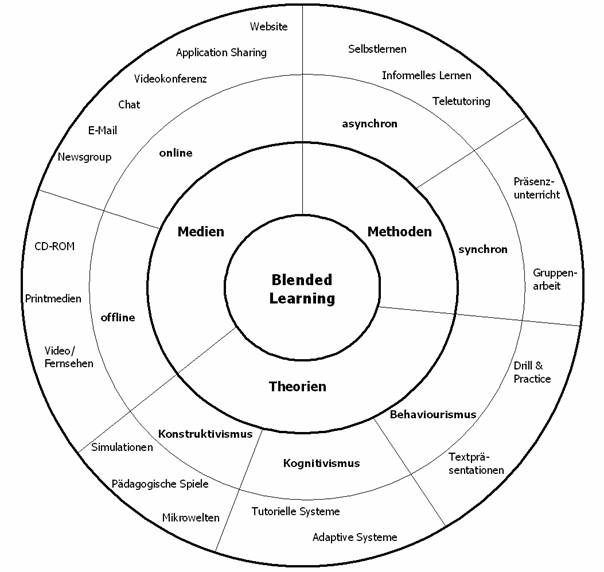
The rationale of our group vodcast was to collaborate and discuss thoughts about Blended Learning and Community of Learning. Our intended audience included parents, teachers, and administrators at our school. The purpose was to inform our audience of how blending learning integrates face to face learning with online technology, and also how the community of learning incorporates the social, cognitive, and teaching presences.

Link to iMovie: http://www.youtube.com/watch?v=MBhfWX_aBbM

My Reflection

Before my group began the iMovie project, I was very overwhelmed. As a group our first responsibility was to evenly divide responsibilities, which helped relieve some of my anxiety immediately. The people in my group included Emily, Kerry, and Nick. Our first task was for everyone to research content and images related to the topics of Blended Learning and a Community of Learning. As we researched, our findings were placed in a Google Docs document that we all shared.

As I reflect, I strongly believe the dividing of responsibilities had a great impact on the success of our project. Everyone had something to do and worked on tasks where some of us had strengths. Here’s the process:

· For planning purposes, I developed the FATP on our research page and Nick created a mind map using Inspiration.

· Kerry created a Research page on a Google Docs document where everyone in the group could document the research, images, and hyperlinks.

· Kerry and Emily were responsible for developing the script and adding the “acting” voices to the Garage Band software. The recorded voices in Garage Band were exported into iTunes.

· Nick and I were responsible for searching for images and downloading the images into iMovie. After each of us found an image, Nick downloaded the image to the desktop and then dragged it to iMovie. If a picture could not be downloaded, a screen shot was taken of the image.

· Nick matched the images to the script.

· I created a Reference page on a Google Docs document for both images and content.

· Emily added the credits and the image and content sources to our movie.

· Everyone in our group continued to search for images that related to the topic. We now have 43 images!!!

Teamwork:

I feel our team worked well together and the process went smoothly. As I reflect, I believe our teamwork improved for two important reasons:

· There was an even division of responsibilities. I found that I had much more to do on project four. Of course, project four involved images and project three did not involve pictures.

· Some image searching, movie editing, and research were done outside of class. This was important because it gave our group an added momentum to complete the project.

As I reflect on teamwork, I realized how important it is to complete tasks ahead of time. I have always been one to turn things in on time. However, with project four I made an effort to perform my tasks “ahead of time”, rather than “on time.” I believe the “ahead of time” philosophy is contagious and motivates other people. I envision myself using this philosophy more in my career.

Mind mapping/Flowcharts:

The FATP process and mind mapping using Inspiration continues to be a great tool for planning.

With a difficult project, mind mapping can prove to be very beneficial.

Tools and Applications:

I mentioned several tools and applications in the process section. I learned a great deal in doing this project. I realized how easy it was to do a screen shot on a MAC. I can see myself doing screen shots on my MAC at work. As you will read in my e-portfolio, I will be using Garage Band with my instrumental music classes, and I will be using Google Docs with my colleagues at work.

Creative Commons Statement 1-I only searched for images that were found under the website http://sites.google.com/site/edvibes/Home/projects/project-cc-2 , therefore, these pictures were Creative Commons images. There was only one exception and that was the “Pattern for Online Inquiry” image which was found under Google. The only reason I utilized it was because it was used on a slide for class.

Creative Commons Statement 2- Our music was selected under the Creative Commons website listed above.

CC statement 3 Emily created a Creative Commons license for our video.

Bibliography of hyperlink resources:

Research Content

Here are five out of seven!

http://en.wikipedia.org/wiki/Blended_learning

http://www.irrodl.org/index.php/irrodl/article/viewArticle/192/274.%20Accessed%2019th %20 March%202006

http://en.wikibooks.org/wiki/Blended_Learning_in_K-12/Blended_Learning_In_Grades_7-8.

http://www.inacol.org/research/promisingpractices/NACOL_PP-BlendedLearning-lr.pdf

http://www.sloan-c.org/publications/survey/pdf/k-12_online_learning_2008.pdf

Images

Here are 10 out of 43!

1. Computer 1

2. Computer 2

3. Computer 3

4. Students in Classroom

5. Blended Learning Kindergarten Classroom

6. Pedagogical Underpinnings for IC

7. Students’ Roles & Input/Output

8. Blended Learning Paradigm

9. Blended Learning Circle

10. Students on Computers

Wednesday, June 16, 2010

Group Podcast Project #3

Our group #1 had four people: Kelly, Emily, Nick, and Jeanine. First we followed the FATP guidelines where 1)the form was a podcast, 2)the audience was coworkers, administrators and parents, 3)the topic was 21st Century Skills and the Flat World, and 4)the purpose was a humorous and informative. Emily used Inspiration to create a mind map. As I reflect on mind mapping, I feel it is a great tool for planning. After the mind mapping is completed, the rest of the project seems to flow.

We divided the research. Nick and I researched the pros and cons of the topic “21st Century Skills and Emily and Kelly researched the pros and cons of the “Flat World.” Based on our research, all of us created questions and answers that we could incorporate into our script for a radio talk show. We all were creating humorous characters. Emily, Nick, and Kelly, and I were having fun throughout this process as we collaborated and brainstormed different ideas.

Nick and Emily worked on the podcast recording using Garage Band. They took jazz music from Creative Commons (CCmixter.org) and incorporated it into the podcast. Nick had prior experience with Audacity, so he was a great guide. When our class is over, I see great possibilities in using Garage Band in my music classes. I’m always looking for new music that will engage students in my instrumental classes and I see Garage Band as a great tool to accomplish my goal.

I felt Emily, Nick, and Kelly were great to work with-they were positive and contributed significantly to the making of our podcast. As I reflect upon the making of our podcast, I remember reading about the positive contributions group learning makes to education. http://en.wikibooks.org/wiki/Blended_Learning_in_K-12/Blended_Learning_In_Grades_7-8

Here are some bibliography hyperlink resources from our group podcast project. The first two links are from my research on 21st Century Skills.

http://www.britannica.com/blogs/2009/03/flawed-assumptions-undergird-the-partnership-for-21st-century-skills-movement-in-education/

http://blogs.edweek.org/edweek/curriculum/2009/09/common_core_steps_up_criticism.html

http://www.ascd.org/publications/educational-leadership/sept09/vol67/num01/21st-Century-Skills@-The-Challenges-Ahead.aspx

Here's a link to our podcast:

https://oncourse.iu.edu/podcasts/site/SU10-SB-EDUC-R503-12254

Tuesday, June 15, 2010

Podcast Blog

I subscribed to ITunes for my podcast. I googled K-12 educational podcasts, and I came across a website of educational podcasts from the University of South Florida. I subscribed to the website, "Technology in K-12 Lesson Plans". I listened to a pirate educational podcast which was appropriate for grades K-2. The format was a movie. The movie was arranged in a cooperative learning and informal style, and the students were involved in the entire learning process . The movie was organized in the following manner: 1) a student takes four pictures of the north, south, east, and west sides of the school. 2) Students make an I-movie of Petey the Pirate. The “pirate” was a young adult who stated, ”If you want to be a pirate just like me, you have to follow the map to the buried treasure.” 3) Students look for the treasure by hanging on to a rope where the distance from one student to the other was one yard. A teacher said this lesson was a cooperative learning experience where students worked together to measure distances to find the buried treasures. The techniques the producer utilized consisted of the following: 1) a short clip of the I-movie “Petey the Pirate,” 2) students unscripted actions and voices showing their cooperative learning experience, 3) teacher’s voice narrating the entire experience during the entire podcast. Here is the hyperlink to my source:

http://deimos3.apple.com/WebObjects/Core.woa/Browse/usf.edu.1273340511.01273340519

Sunday, June 13, 2010

Richard Baraniuk on Open Source Learning

Baraniuk says the books are expensive and create walls between the books and their readers. He states that digital books are shared and improved every 25 seconds, instead of updated every two years. I like Baraniuk’s perception. The average textbook is updated every two years in a global world that is changing by minutes, or even seconds.

Baraniuk talks about the “published on demand books” being much cheaper than a single author book. The middle man has been taken out of the equation. I’ve heard some colleges are allowing students to rent books rather than buy the books. Have they heard about “published on demand” books?

I enjoyed Baraniuk’s comments on Tech XML. He talks about “turning pages into lego blocks”. Learning is personalized for each student based on the context and each student’s language, learning style, and interest. The XML Technology Center offers assistance to develop all kinds of “XML based applications”. Here’s the website: http://www.oracle.com/technology/tech/xml/index.html

Toss the Traditional Textbook: Revamping a Curriculum

This article states that there are some advantages to having an online curriculum. One advantage is having varied and up to date materials. I remember a comment that the professional development picture writing instructor made at a workshop this past week at Perley. She analyzed a social studies book. In her opinion, the book was very “dry”, and had no voice since it was written by twenty one people. The topics in the book needed to be supplemented by other sources.

Another advantage of an online curriculum is that it could enhance the education of both students and teachers. “Best practices and lesson plans” could be shared by teachers. I think this is an excellent thought. I wish this sharing of ideas could be experienced more in the music area of my school corporation.

I did have a concern after reading this article. The risks of unregulated editing is mentioned, and also the hope of attracting the expertise of enough teacher to “police” the others. How can the regulation be accomplished? How can we make sure the online curriculum is meeting the standards?

Minds on Fire: Open Education, the Long Tail, and Learning 2.0

I felt this was a very good and informative article. Authors Brown and Adler stated that we live in a global world where we all need to “acquire new knowledge and skills on an almost continuous basis.” I agree with this perception. I worry that my children will go to school for a career that seems to have a future and after they graduate that career or job will be obsolete or have less demand.

The authors talks about the Open Educational Resources (OER) movement which encourages sharing and collaboration, and content which could be free, inexpensive, or have few limitations. Through Web 2.0 people are participating and collaborating through wikis, blogs, social networking, and virtual communities. The authors mention that the Web 2.0 supports “multiple modes of learning.” This is consistent with other articles I have read. These articles say that the internet supports different learning styles. As we all know, students learn in different ways, whether it is auditory, visual, kinesthetic, etc.

I especially found the “Closing the Loop” section of the article interesting. The authors mention that libraries, museums, and archives all store information, but are they reflective? Are they ongoing? Are they shared? Are they up to date? At one meeting at my school last week, one teaching mentioned the difficulty of finding books that everyone needed for children’s picture writing topics such as “Time of Day”, “Animals”, etc. I suggested a google docs document where teachers could input the title of the book they had used for a specific topic. The list would continue to grow as teachers shared their titles and information. Teachers could refer to the google docs list whenever they needed a book and continue updating the titles.

Wednesday, June 9, 2010

Mind Mapping and Information/Communication Website

I thought project number two which includes the mind mapping and information/communication website technology was very helpful. I’ll begin with the mind mapping process. I utilized Inspiration as my mind mapping tool. Once I understood the basics of Inspiration, I thought it was a great device for collecting my thoughts and deciding how I was going to plan my information/communication school website on Google Sites. After the mind mapping was complete, my content and ideas easily transferred to my website.

I feel creating my own information/website on Google Sites is one of the best tools I will use to communicate to students, parents, colleagues, and administrators as I enter another year of teaching in the fall. I realized during the past school year that many parents are not familiar with my instrumental program. On my website I intend to share information students are learning in my classroom for each grade. I’m planning to include pictures of students playing instruments, videos of students playing, and links to educational and fun websites. Since I am only in the planning stage, I hope to expand and improve as I collect feedback and gain experience. I received some good ideas by looking at other teachers’ websites on the internet. I am sure I will expand my creativity further by looking at websites produced by my classmates.

http://sites.google.com/site/jeanclarinet12/

Ken Robinson Says Schools Kill Creativity

Ken Robinson begins stating that “Children have tremendous talents, but we squander them.” I can’t speak of other schools, but I work at Perley Fine Arts Academy, and the teachers and employees do the opposite: talents are nurtured and developed, and the results keep blowing me away. I am so encouraged by the talents and ambitions of these instrumentalists, singers, actresses, dancers, and artists. Uncovering these talents is what makes my job rewarding. My hope is that other teachers will continue to encourage these aspiring young artists once they leave Perley for middle school.

Ken Robinson talks about a girl drawing a picture, and says the drawing captured her attention. At Perley we have a “picture writing” program where a student paints pictures, and then writes about the pictures. This program increases engagement and increases vocabulary and writing skills. Here’s the Perley website: http://sbcsc.schoolwires.com/perley/site/default.asp.

Robinson talks about students being artists, but by the time they become adults, they are no longer artists. Adults are no longer prepared to be wrong. I agree with the feeling that once students grow up and become adults, some are more afraid to take risks, and as a number of people become older, some of their dreams fade. Maybe some were not encouraged along their journey?

Monday, June 7, 2010

Bloom’s Taxonomy Blooms Digitally

I thought Andrew Church’s article was excellent-very informative and thought provoking. I’ll begin with Lori Anderson’s revision of the original Bloom’s Taxonomy. I think the use of verbs rather than nouns makes the thinking skills easier to understand and visualize. The order was changed in the revised taxonomy since evaluation comes prior to creating. I believe, however, that evaluation can sometimes come after creating. Imagine creating a vaccine, evaluating the consequences, and creating a new type of vaccine that is better than the first vaccine.

Church’s “digital taxonomy map” is awesome and helpful. It emphasizes the digital world’s encouragement of discussion and collaboration. As I read the digital taxonomy map, I was reminded once again of my “digital immigrant” status.

More information on Lori Anderson’s revision of Bloom’s Taxonomy may be found at

http://deedraliz.blogspot.com/2007/03/review-of-article-on-blooms-taxonomy.html

Copyright Responsibilities of Educators

When I took my graduate research classes this past year, I was told that if I utilize someone else’s work, I need to cite that source. I feel the same rules should apply to digital information. I believe it is alright to use the information, but if it is not my work, I have a professional and ethical responsibility to cite the owner’s work. In the schools, I believe emphasis is placed on citing sources in a research paper. I don’t think enough importance, however, is placed on citing digital information. For instance, in my computer class last semester, many students were copying “may be subject to copyright” images of the Titanic and placing in their power point presentations. I cannot speculate if people were citing their sources, but I sincerely doubt it since the teacher did not request it.

Wednesday, June 2, 2010

Music Rhythms

My Trackstar Number is: 409023

My Google Form Published is: Link: http://spreadsheets.google.com/viewform?formkey=dG1RMWJCQVd5ZS1vN29TaU1RZFFVTmc6MQ

1) The topic and target student age group is: Reading and identifying basic rhythms for Grade 1

2) The state standard(s) this lesson will address is: 1.5 Students read basic rhythms and pitch using syllables and utilizing relevant examples from repertoire. They identify quarter and eighth notes and quarter rests.

http://dc.doe.in.gov/Standards/AcademicStandards/StandardSearch.aspx

3) My objectives are:

a) First grade students will understand, remember, and recognize quarter and eighth notes and quarter rests.

b) Students will apply this knowledge by playing sticks, performing actions, and playing games.

c) After they have a solid background of quarter and eighth notes and quarter rests, they will be introduced to half notes.

4) For each of your 5 websites create a question for assessment and the answer. Plan your assessment in the form below.

I. Website Name Music Lessons - Rhythm and Note Values

A. URL http://www.youtube.com/watch?v=GcytNP4dMGo

B. Annotation

1. Task: Students will watch a short video on the rhythmic values of whole, half, quarter, and eighth notes. Children can perform the actions with the video.

2. Purpose: Students will understand the different values of half, quarter and eighth notes.

3. Assessment #1: How many beats does a half note receive?

4. Answer #1: two beats

5. Assessment #2: How many beats does a quarter note receive?

6. Answer #2: one beat

7. Assessment #3: What do you say for a half note?

8. Answer #3: ta-ah

9. Assessment #4: What do you say for a quarter note?

10. Answer #4: ta

11. Assessment #5: What do you say for two eighth notes?

12. Answer #5: ti-ti

II. Website Name Step, Clap, Kick

A. URLhttp://www.lessonplanspage.com/MusicPEStepClapKickQuarterNoteRestRhythms38.htm

B. Annotation

1. Task: Students perform different actions for quarter, half, and eighth notes, and quarter

rests. Actions are performed to a steady beat. For a quarter note, they walk. For a half note, they

lift their leg up and down. For eighth notes, they jog. For a quarter rest, they kick one of their legs.

2. Purpose: Students will recognize the differences between quarter, half, and eighth notes and quarter rests by performing actions.

3. Assessment#1: What action do you do for a quarter note?

4. Answer #1: walk

5. Assessment #2: What action do you do for a half note?

6. Answer #2: leg lift

7. Assessment #3: What action do you do for two eighth notes?

8. Answer #3: jog

9. Assessment #4: What action do you do for a quarter rest?

10. Answer #4: kick

III. Website Name Rhythm Basketball

A. URL http://teachers.net/lessons/posts/4109.html

B. Annotation

1. Task: Students play a game using quarter, half, and eighth notes and quarter rests (adjusted for difficulty). The teacher writes a rhythm pattern on the board. To play the pattern, students tap sticks. When a student plays the pattern correctly, that student may shoot a paper basketball into the waste basket.

2. Purpose: Students will remember quarter, half, and eighth notes and eighth rests.

3. Assessment #1: How do you play a quarter note on the sticks?

4. Answer #1: one tap on the sticks saying ta

5. Assessment #2: How do you play a half note on the sticks?

6. Answer #2: a slide on the sticks saying ta-ah

7. Assessment #3: How do you show a rest with the sticks?

8. Answer #3: sticks are not touching

9. Assessment #4: How do you play eighth notes on the sticks?

10. Answer #4: two short taps on the sticks saying ti-ti

IV. Website Name Lego Rhythms

A. URL http://www.lessonplanspage.com/MusicLegoRhythms13.htm

B. Annotation

1. Task: Students will use legos to compose rhythms using quarter, half, and eighth notes. Students will work in pairs. The teacher will tell the students a certain colored lego is a quarter note and another colored lego is an eighth note. Students will identify that they can fit two eighth note legos on a quarter note lego. Next, the students will be told another colored lego is a half note. They will recognize that they can fit two quarter note legos on a half note lego.

2. Purpose: Students will apply their knowledge of quarter, half, and eighth note values by using legos to compose basic rhythm patterns.

3. Assessment #1: How many quarter note legos equal one half note lego?

4. Answer #1: two

5. Assessment #2: How many eighth note legos equal one quarter note lego?

6. Answer #2: two

(The teacher would observe each rhythm patterns to check for accuracy.)

V. Website Name Rhythm Cakewalk

A. URL http://www.lessonplanspage.com/MusicRhythmCakewalkActivity13.htm

B. Annotation

1. Task: Students walk in a circle while keeping a steady beat to the music. When the music stops, the children freeze in their places. A different rhythm card will be next to each child. The teacher asks the first question. When the music stops for the second time, the teacher asks the second question, etc.

2. Purpose: Students will recognize quarter, half, and eighth notes and quarter rests used in rhythm patterns.

3. Assessment #1: What rhythm card shows ta, ta, ti-ti, ta?

4. Answer #1: If a student is standing in front of the particular card, the student raises his or her hand.

5. Assessment #2: What rhythm card shows ti-ti, ta, ta, rest?

6. Answer #2: If a student is standing in front of the particular card, the student raises his or her hand.

7. Assessment #3: What rhythm card shows ta-ah, ta, ta?

8. Answer #3: If a student is standing in front of the particular card, the student raises his or her hand.

VI. Website Name Note Twister

A. URL http://www.lessonplanspage.com/MusicNoteTwisterIdea16.htm

B. Annotation

1. Task: Quarter, half, and eighth notes and quarter rests are used in the Twister game. One concept is drawn on each circle. The notes do not follow the color patterns. This will prevent students from thinking that all quarter notes are green.

2. Purpose: Students will recognize quarter, half, and eighth notes and quarter rests.

3. Assessment #1: Will you place your right foot on the quarter note?

4. Answer #1: Students place right feet on the quarter notes.

5. Assessment: #2 Will you place your left foot on the half note?

6. Answer #2: Students place left feet on the half notes.

7. Assessment #3: Will you place your left hand on the eighth notes?

8. Answer #3: Students place left hands on the eighth notes.

9. Assessment #4: Will you place your right hand on the quarter rest?

10. Answer #4: Students place right hands on the quarter rests.

Name: Jeanine Bilik

Date: 6/02/10